(privat)
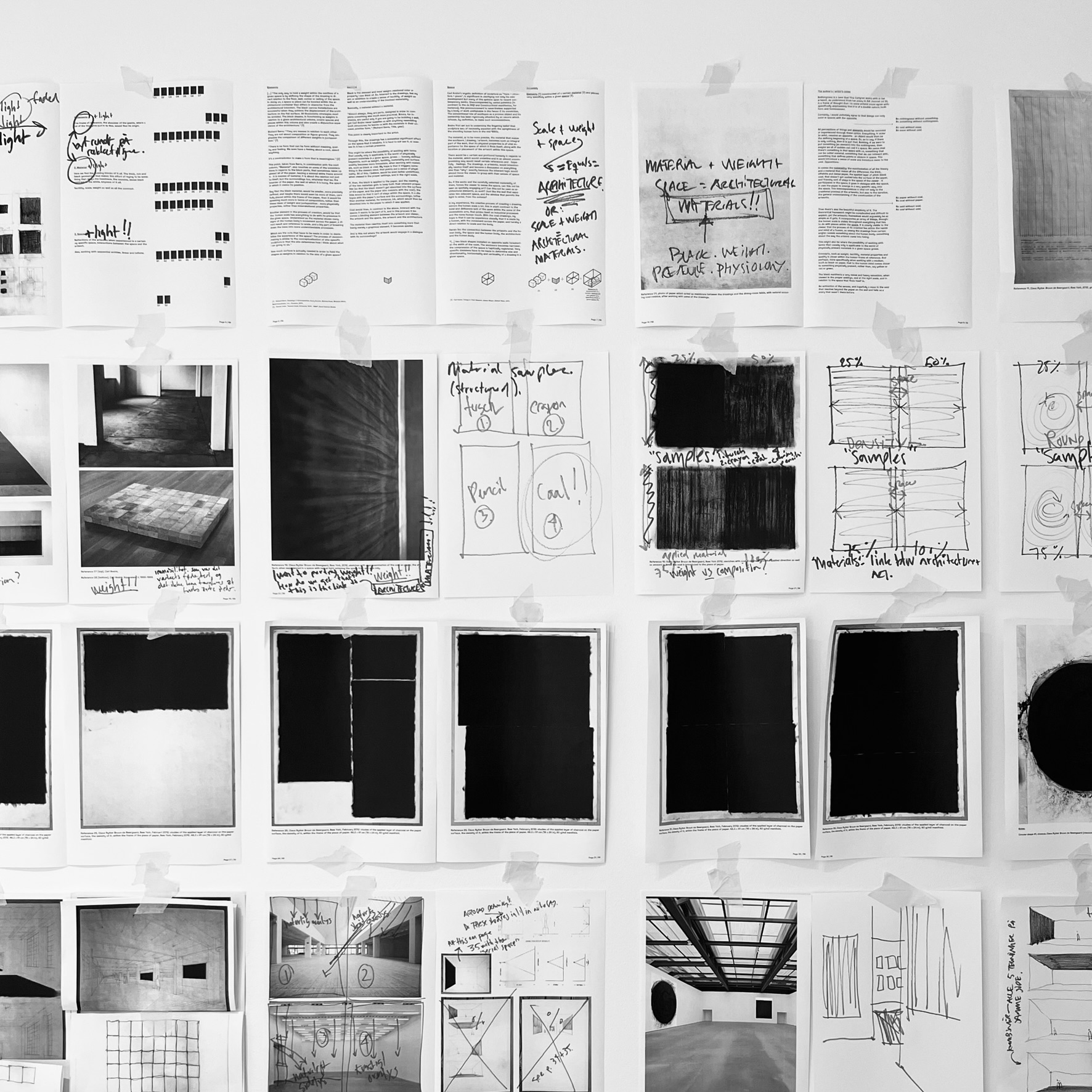
Note: This project is in an ongoing process.
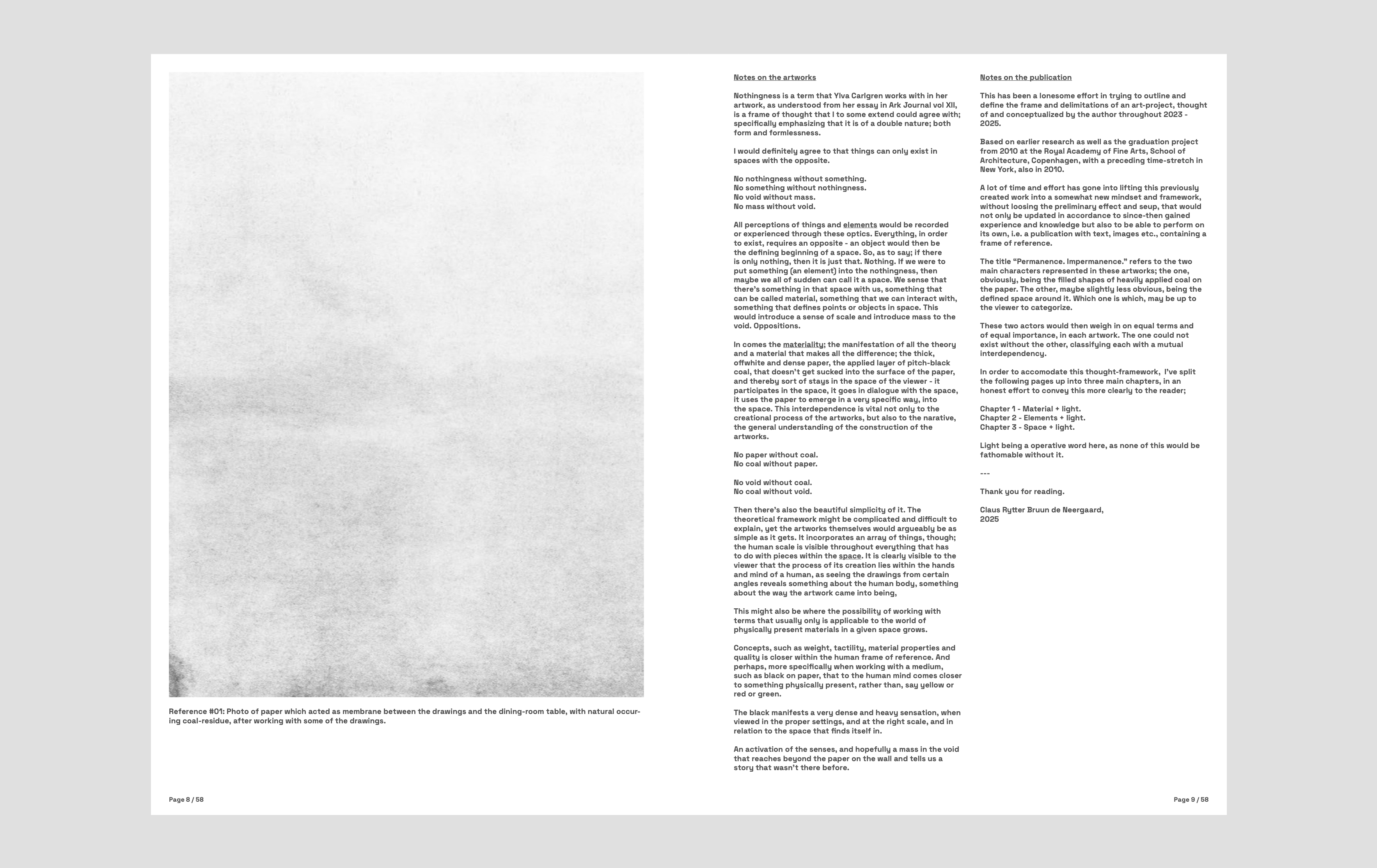
Nothingness is a term that Ylva Carlgren works with in her artwork, as understood from her essay in Ark Journal vol XII. And it is a frame of thought that I to some extend could agree with; specifically emphasizing that it is of a double nature; both form and formlessness.
I would definitely agree to that things can only exist in spaces with the opposite.
No nothingness without something.
No something without nothingness.
No void without mass.
No mass without void.

All perceptions of things and elements would be recorded or experienced through these optics. Everything, in order to exist, requires an opposite - an object would then be the defining beginning of a space. So, as to say; if there is only nothing, then it is just that. Nothing. If we were to put something (an element) into the nothingness, then maybe we all of sudden can call it a space. We sense that there’s something in that space with us, something that can be called material, something that we can interact with, something that defines points or objects in space. This would introduce a sense of scale and introduce mass to the void. Oppositions.
In comes the materiality; the manifestation of all the theory and a material that makes all the difference; the thick, offwhite and dense paper, the applied layer of pitch-black coal, that doesn’t get sucked into the surface of the paper, and thereby sort of stays in the space of the viewer - it participates in the space, it goes in dialogue with the space, it uses the paper to emerge in a very specific way, into the space. This interdependence is vital not only to the creational process of the artworks, but also to the narative, the general understanding of the construction of the artworks.
No paper without coal.
No coal without paper.
No void without coal.
No coal without void.
Then there’s also the beautiful simplicity of it. The theoretical framework might be complicated and difficult to explain, yet the artworks themselves would argueably be as simple as it gets. It incorporates an array of things, though; the human scale is visible throughout everything that has to do with pieces within the space. It is clearly visible to the viewer that the process of its creation lies within the hands and mind of a human, as seeing the drawings from certain angles reveals something about the human body, something about the way the artwork came into being,
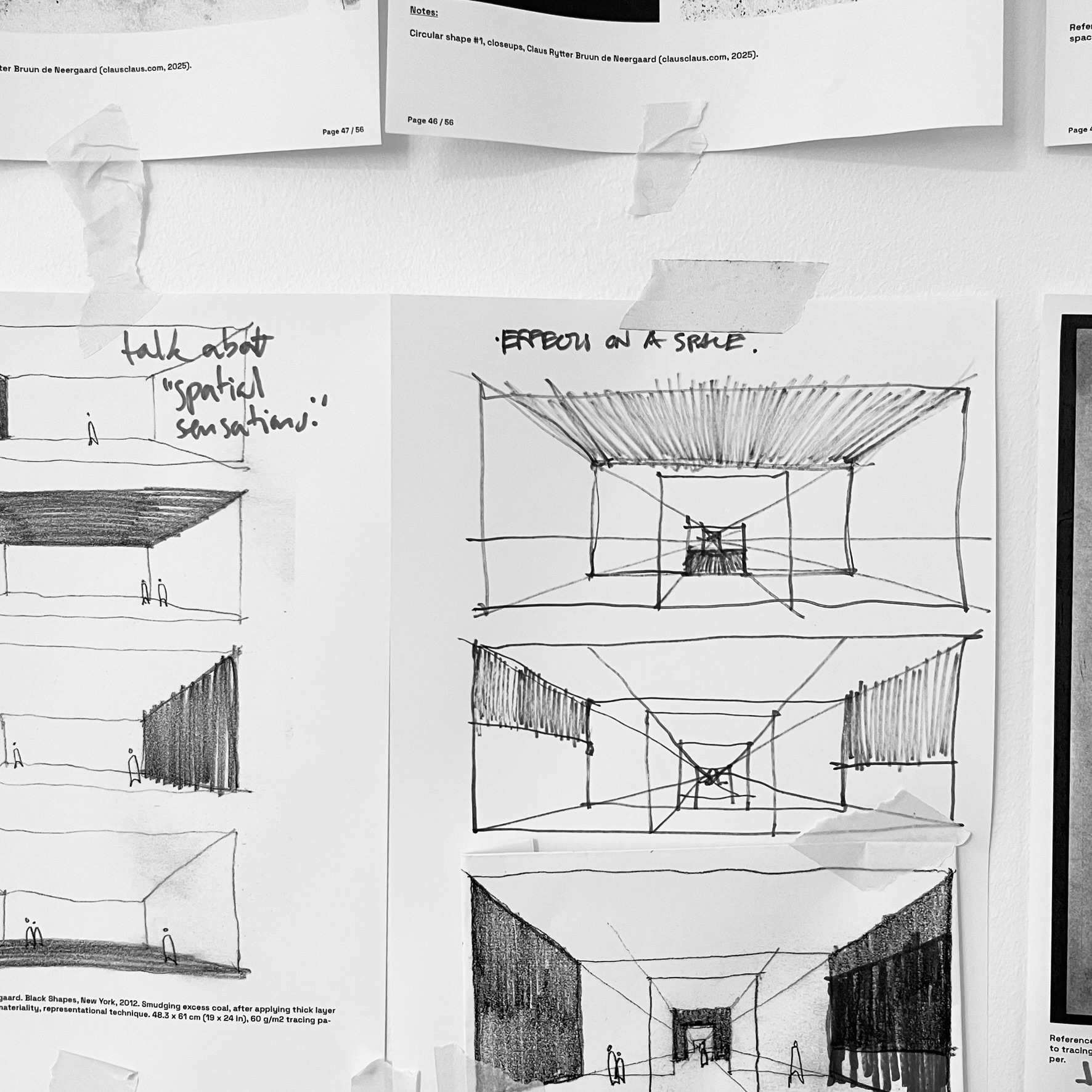
This might also be where the possibility of working with terms that usually only is applicable to the world of physically present materials in a given space grows.


Concepts, such as weight, tactility, material properties and quality is closer within the human frame of reference. And perhaps, more specifically when working with a medium, such as black on paper, that to the human mind comes closer to something physically present, rather than, say yellow or red or green.
Below is a few select pages from the publication:

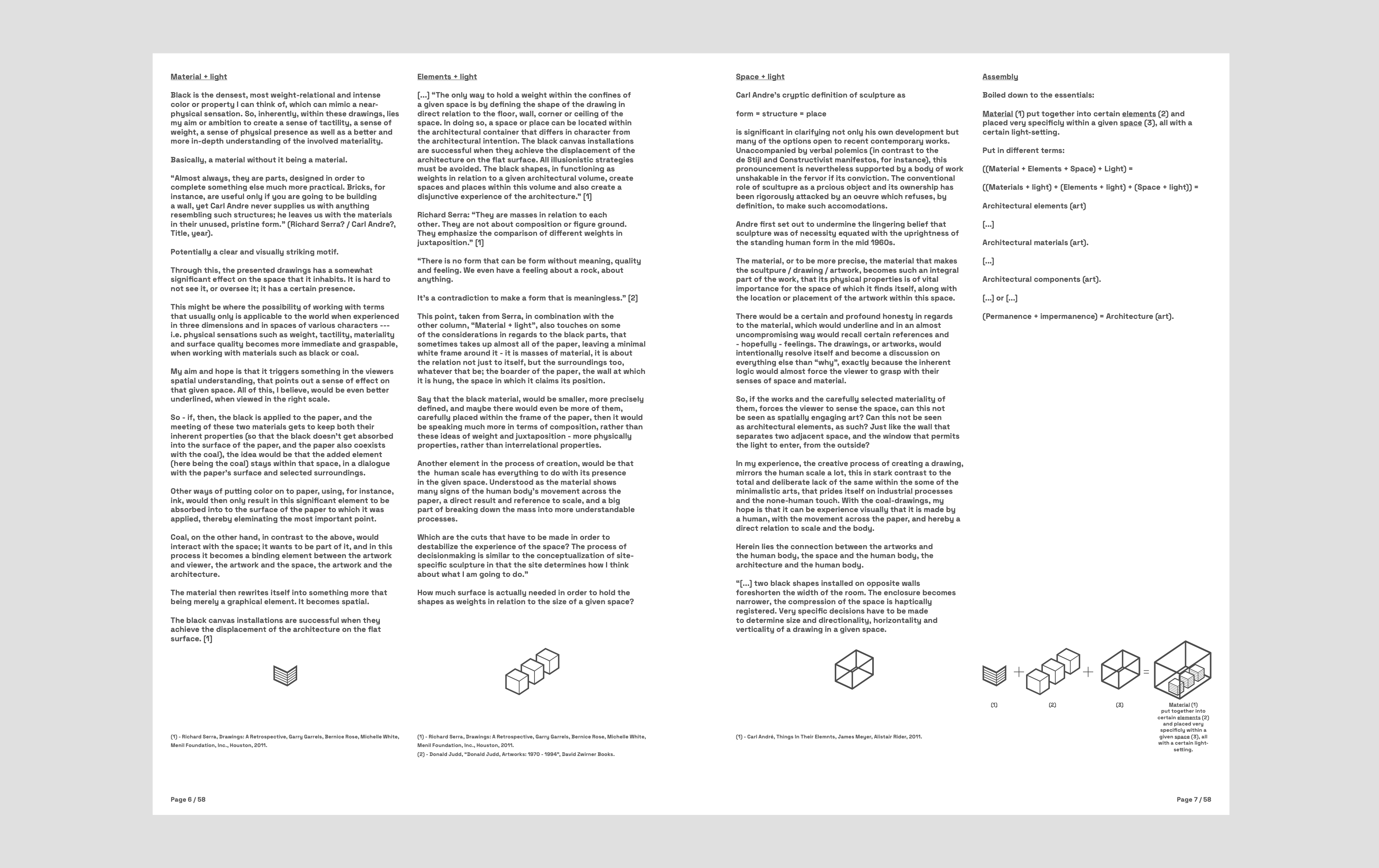
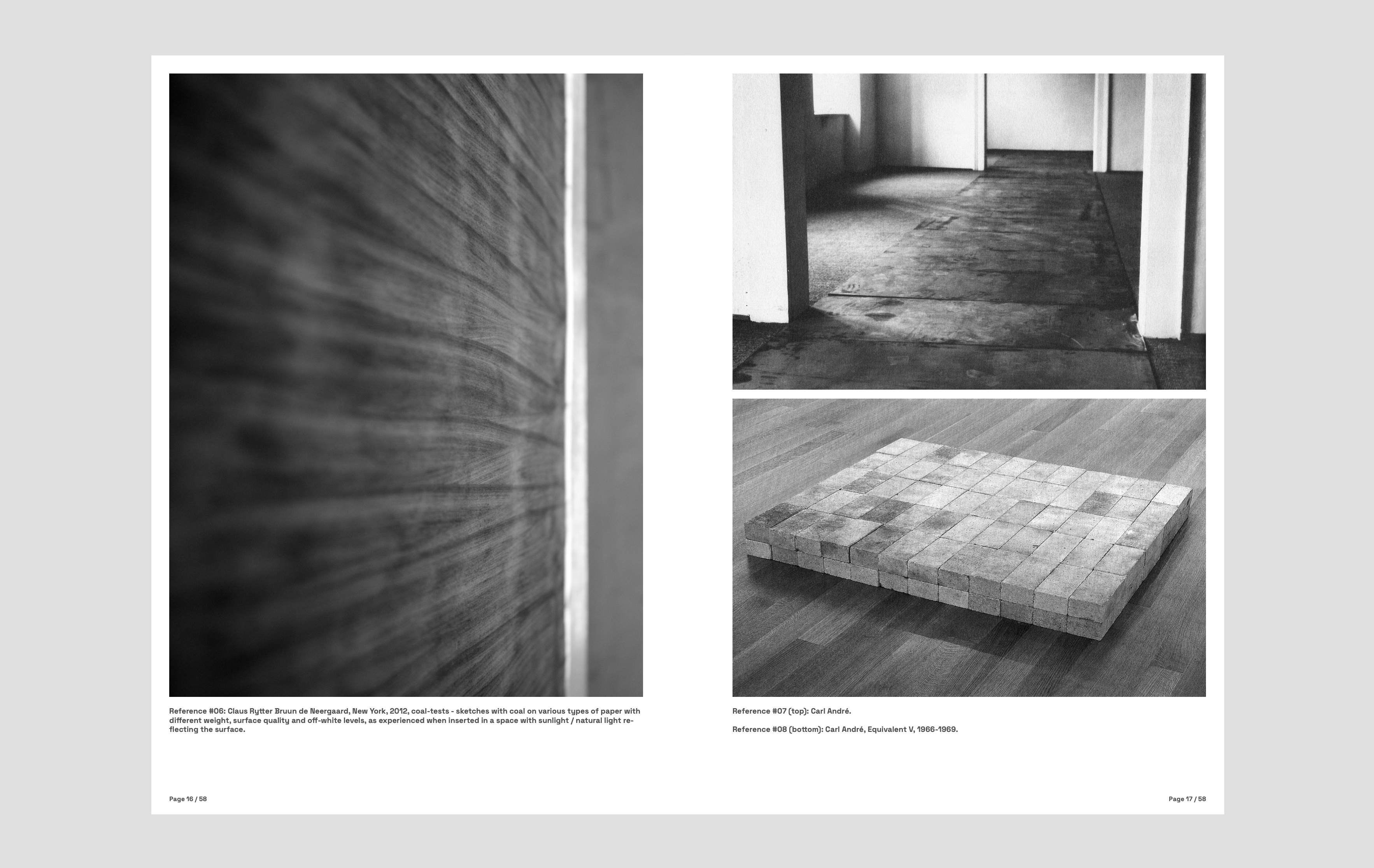
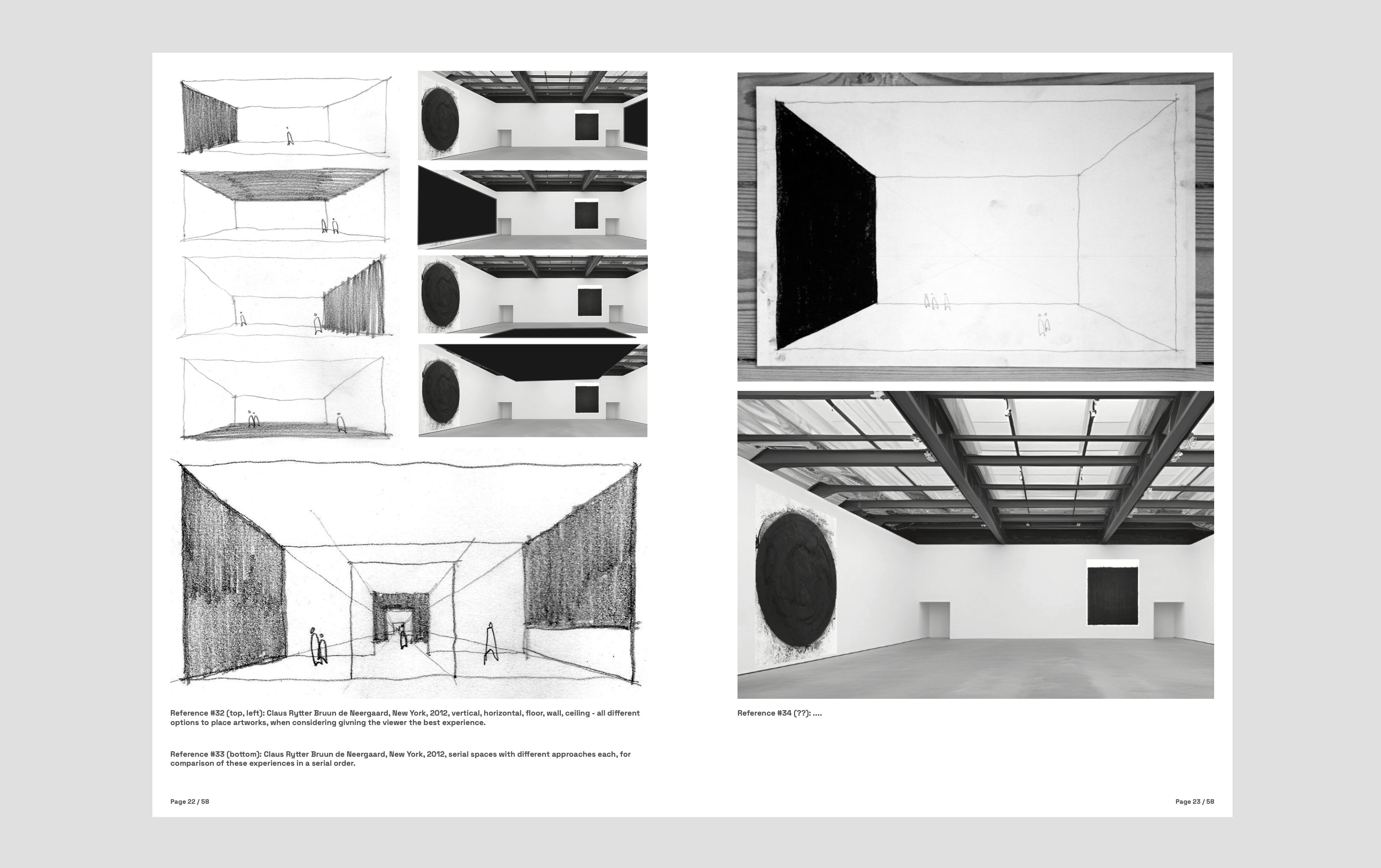
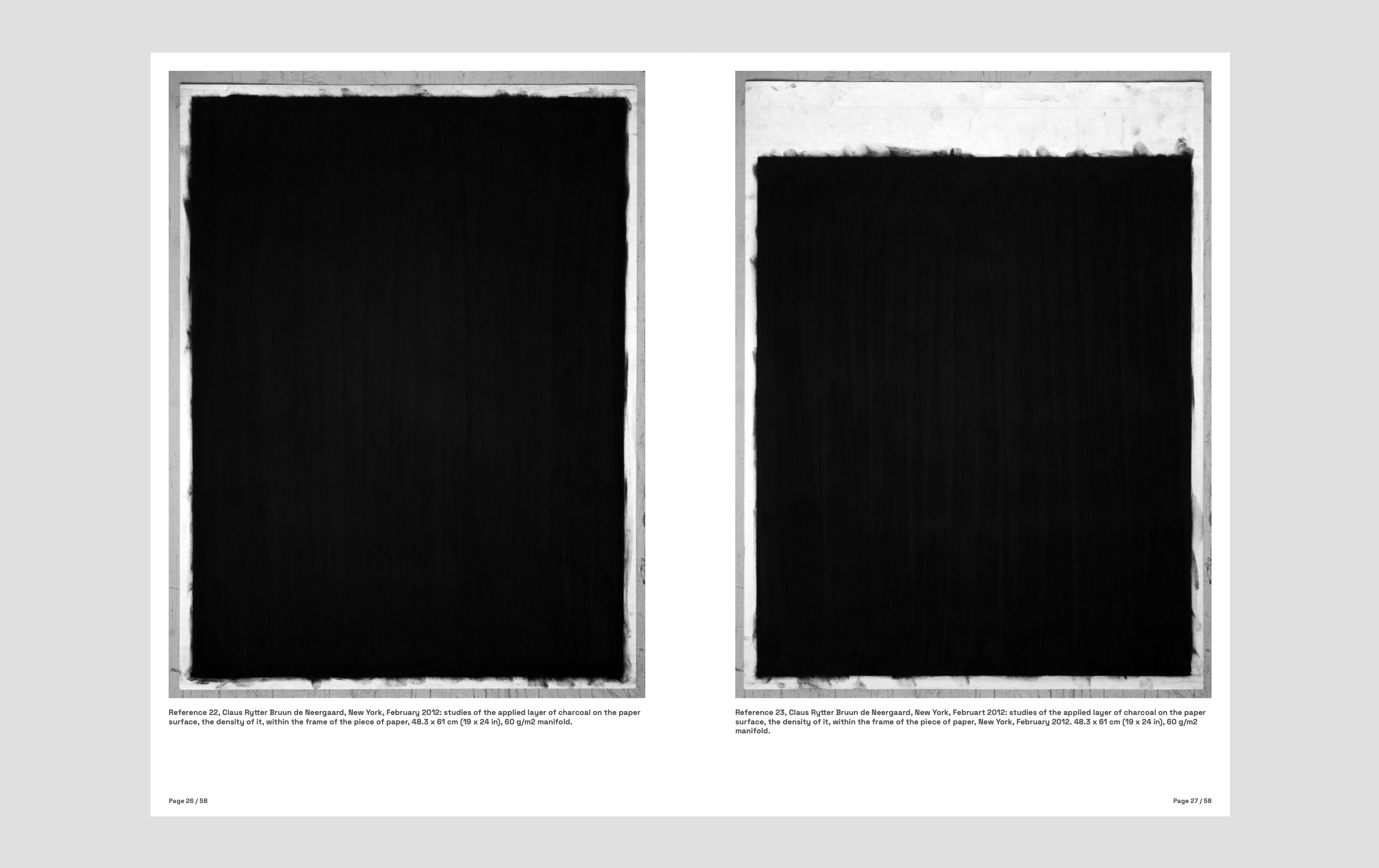

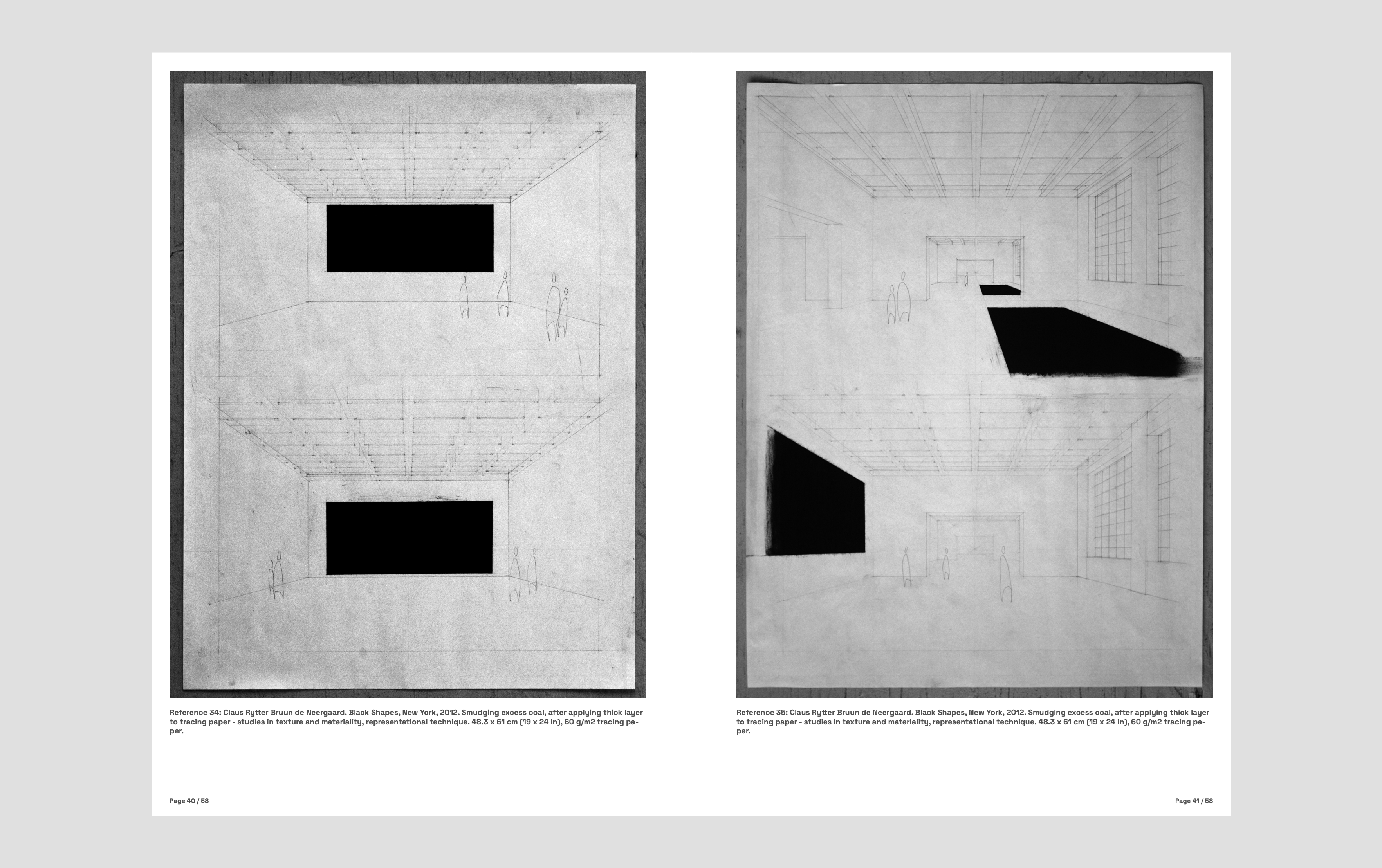
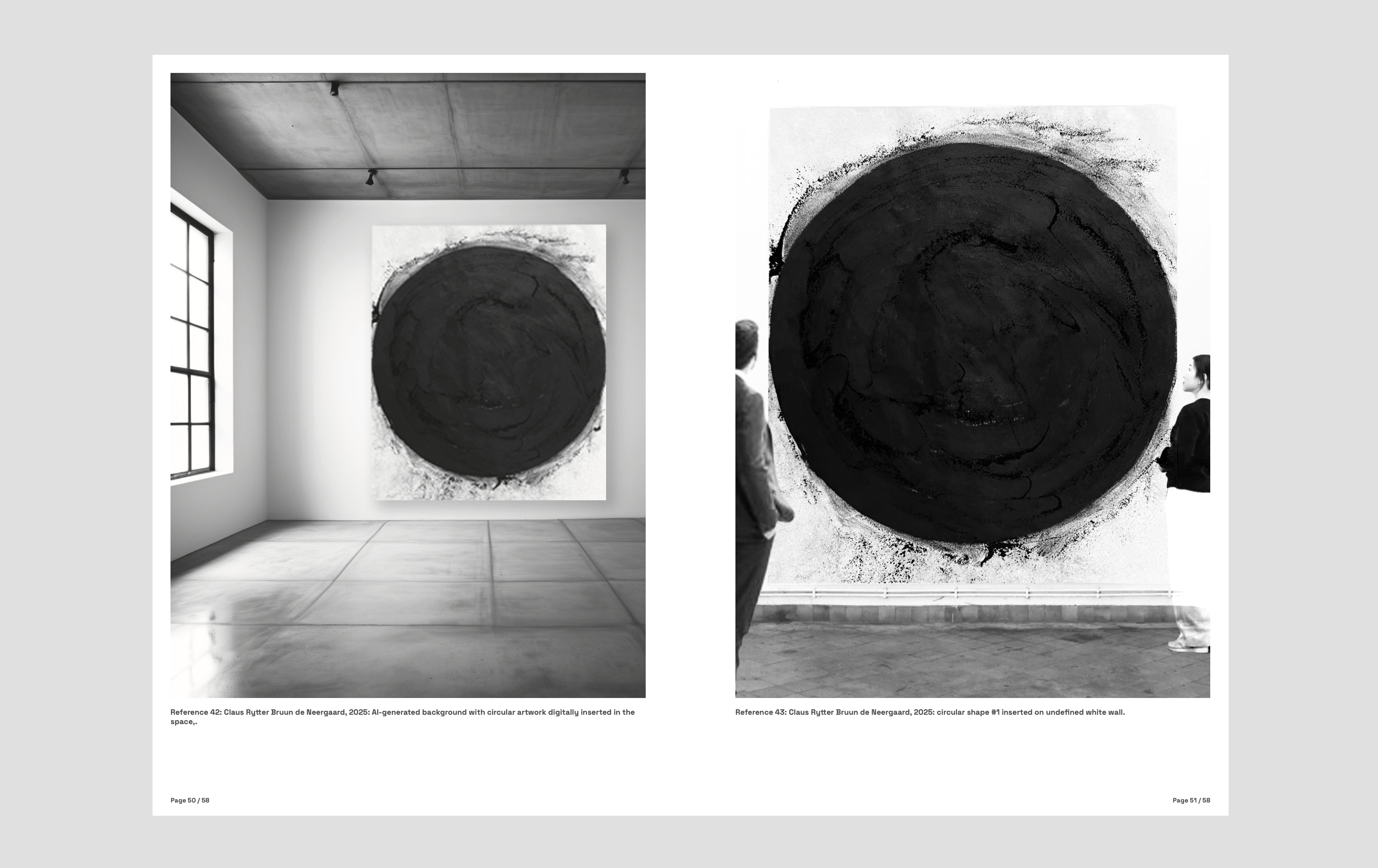
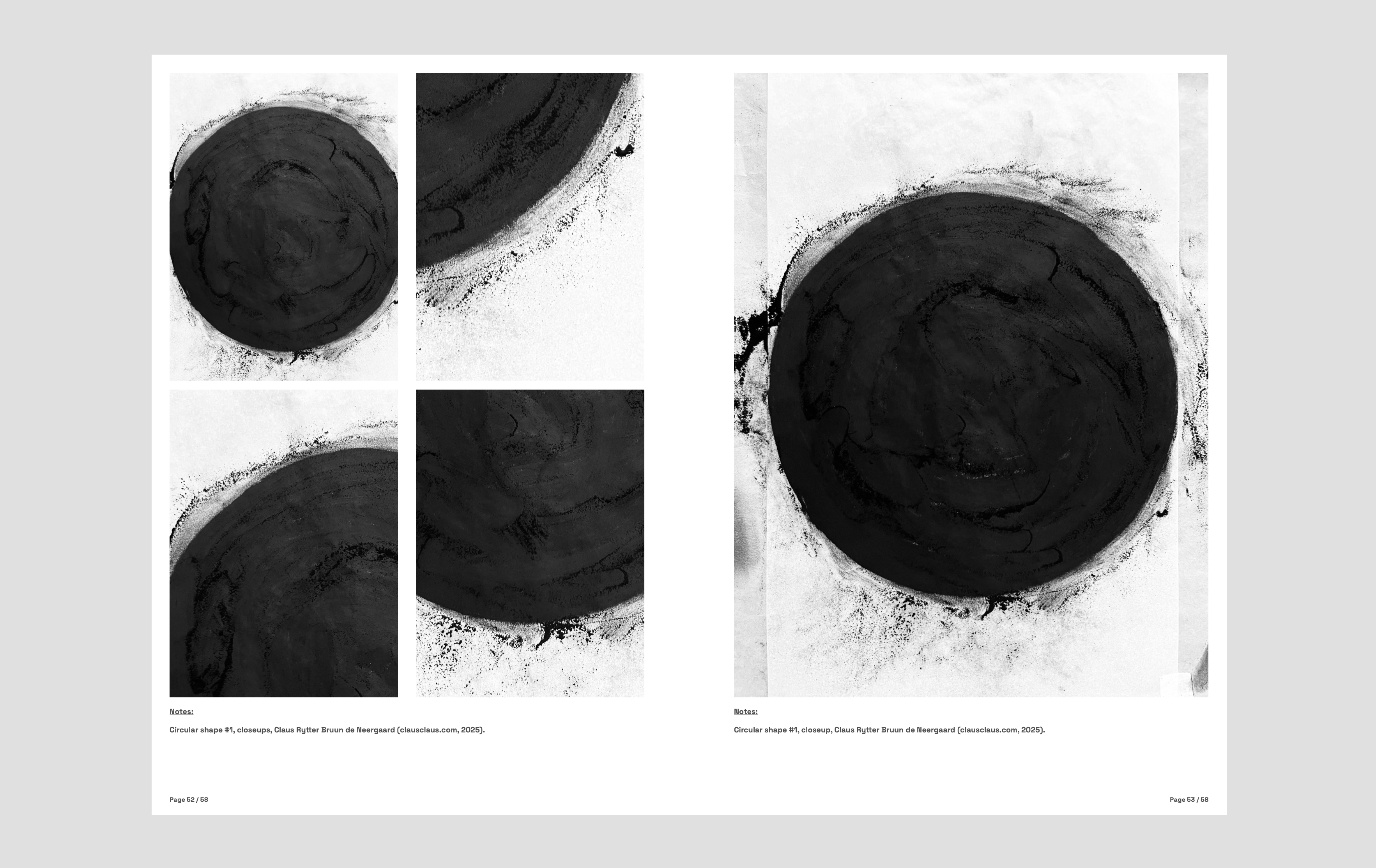
The black manifests a very dense and heavy sensation, when viewed in the proper settings, and at the right scale, and in relation to the space that finds itself in.
An activation of the senses, and hopefully a mass in the void that reaches beyond the paper on the wall and tells us a story that wasn’t there before.


(privat)
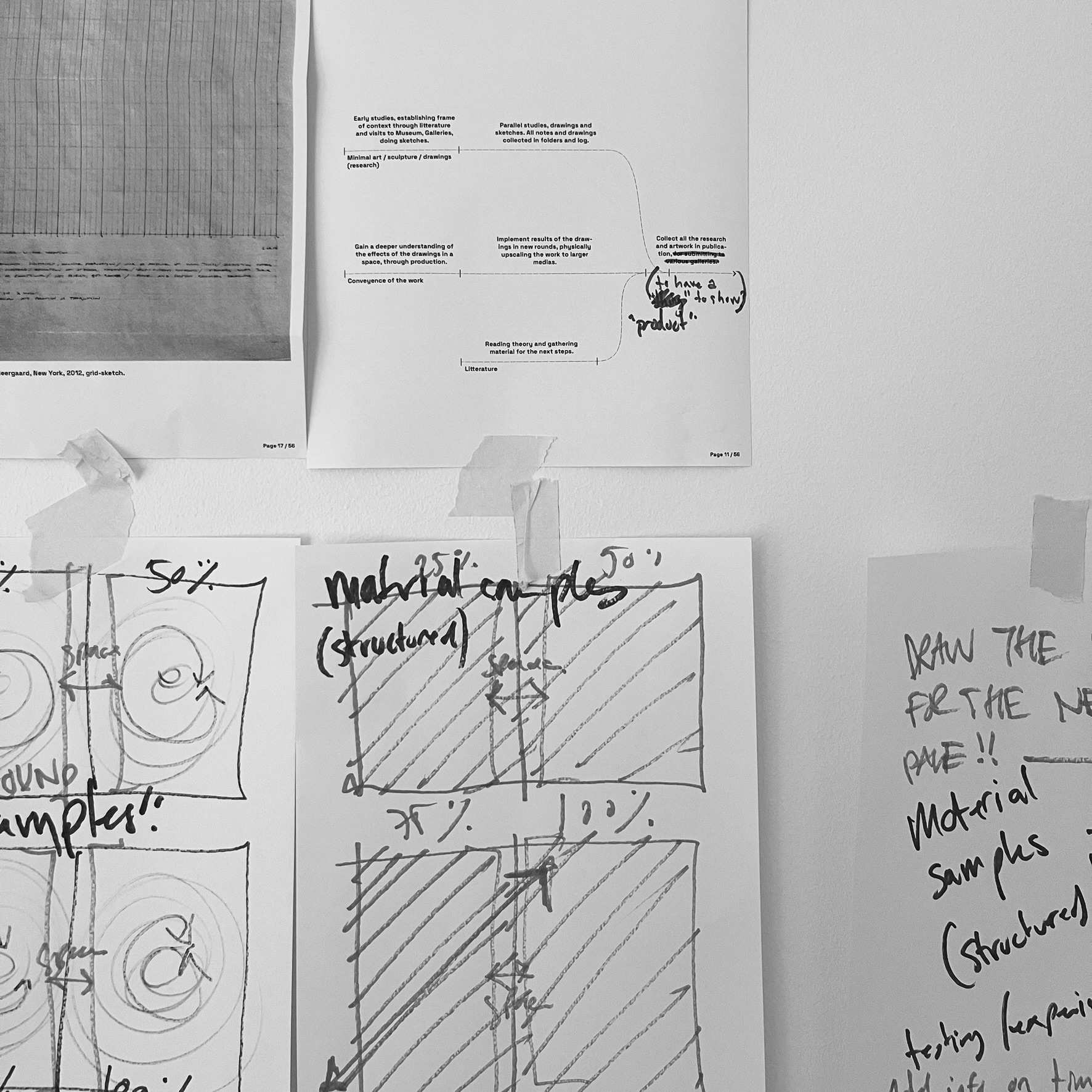
Disclaimer: Det skal understreges at disse dokumenterede overvejelser på nuværende tidspunkt ikke er fyldestgørende, og i virkeligheden repræsenterer et ganske specifikt udtag eller udpluk fra en langt større tankeramme og helhed. Nedenstående, udvalgte info og grafik er altså et forsøg på at illustrere nogle af de overordnede, principielle overvejelser bag arbejdet, mere end at fungere som udtømmende oplistning af alle aspekterne.
Derfor; dette er en igangværende proces.
Mit arbejde og den opsamlende publikation kredser om et designsystem der søger at forene Revit-indsatsen omkring et fælles, ensrettet, visuelt og systematisk sprog, med fokus på udvikling af Revit Families (digitale bygge-objekter) på tværs af en organisation eller en tegnestue. Systemet kan, integreret på den rigtige måde, måske være med til at reducere den tidsmæssige investering, optimere workflowet og ensrette det endelige resultat, samtidig med at løfte objekterne (og herigennem projekterne) et skridt fremad.
En fremtidssikring af indsatsen.
Projektet vil altså, jf. ovenstående, omhandle mange af de dagligdagsprocesser der arbejdes med i projekter af forskellige størrelse og art, gennem alle projekteringsfaserne og nok delvist influeret af alle involverede personer på en arbejdsplads. For at imødekomme mine egne, opsatte krav om at dokumentationen skal kunne fungere som et slags referenceramme / opslagsværk, har jeg forsøgt at inddele de forskellige overvejelser i kapitler og grupperinger, der gerne skulle kunne noget hver især, og samtidig, så vidt muligt, fungerer i en nogenlunde etableret rækkefølge eller proces, og selvfølgelig som en større helhed.
I kombination med det digitale bibliotek af opbyggede, typiske objekter / Families, baseret på nærværende retningslinjer, bør der være tilstrækkeligt grundlag for et videre forløb eller indsats, udført ved en organisation eller tegnestue.
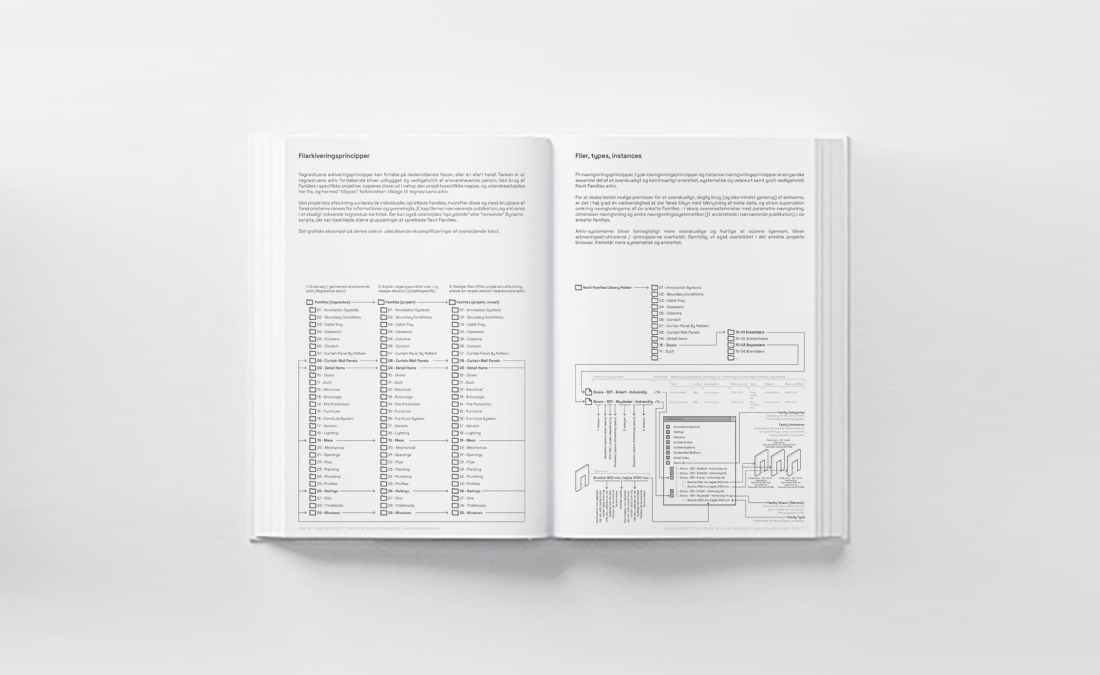


Kernen i BIM (Building Information Modelling) er denne “intelligente” dataopsamling og arkivering der, udover information omkring geometri og placering, også indeholder alle relevante data tilknyttet bygningen (Project) og samtlige af dens komponenter eller bygningsdele (Families), hvilket kan reducere misforståelser, fremskynde designprocessen og bygge farbare broer mellem hold, der samarbejder for frembringelsen af hurtige, velovervejede og resultatorienterede løsninger. Publikationen er altså afstedkommet ud fra en betragtning om gerne at ville videreformidle og skabe en platform for det videre arbejde med disse førnævnte Families, gennem forklarende tekster og illustrationer, søgt udformet som et letfordøjeligt, grafisk opslags- eller referencehæfte, og affødt af mange timers arbejde med emnet.
Og for, på sigt, at få skabt rammerne for et større arkiv indeholdende klargjorte, fleksible hyldevarer med standardiseret indholdsopbygning, navngivningsprincipper og bagvedliggende metode, der sikrer en langt højere brugervenlighed, et større fælles grundlag for opsamling af data og større transparens.
Denne dokumentation er altså gradvist afstedkommet gennem mange overvejelser gjort af undertegnede gennem de sidste par år, og i udgangspunktet med den hensigt at fungere som noter til mig selv, samlet ét sted. Dog er det relativt hurtigt blevet tydeligt, at det samlede arbejde, måske også kan bruges i en videreformidling til andre relevante fagpersoner der, lige som jeg selv, har haft et behov for en større transparens, og forhåbentlig herigennem, en mere systematisk tilgang til emnet.

Grundpremissen for alt dette er, at strømline produktionen af Revit Families / BIM-content for på denne måde at opnå en betragtelig tidsbesparelse og højne kvalitetsniveauet. Ofte, når vi, som arkitekter eller bygningskonstruktører, går ind på produkt-specifikke hjemmesider og downloader Revit content direkte fra deres online kartoteker, finder vi over-modellerede, over-komplicerede, data-tunge Families med importeret 2D CAD-data, manglende, essentiel information, ukorrekt, tilknyttet klassificering og uendelige rækker af “warnings” der popper op, blot vi ændrer lidt i nogle af de alt for mange og usammenhængende parametre. Alt sammen medvirkende til en ophobning af ubrugbare elementer, eksponentielt og unødigt skred i data-størrelser, og herigennem drastisk nedsat brugsværdi samt massiv tidsforøgelse tilknyttet for den enkelte projekterende og de enkelte projekter.
De i denne publikation nedfældede tanker søger altså at opridse en arbejdsmodel for at kunne imødekomme førnævnte problemstillinger, og har derved til hensigt at samle store dele af (primært) arkitekt-fagets nødvendige projektdokumentation, illustreret gennem geometriske repræsentationer af fremtidige projekter og bygningsdele, deres tilknyttede information og den endelige sammensætning af alle disse.

Et højere niveau af præcision og konsistens i det videre arbejde samt minimering af gentagelsestunge processer bør også kunne forstås, opnås og integreres med denne metode som udgangspunkt. Kampen ligger altså fremadrettet i, at kunne samle objekterne og deres tilblivningsprocesser under en række strammere - og måske nok i større omfang - centralt administreret retningslinjer og systematiker, der vil kunne sikre en mere gennemgribende konsistens i projekterne. Resultatet vil derfor, forhåbentlig, vise sig ved et højere og mere uddybende kvalitetsniveau hvor disse bygningsdele implementeres, set gennem ikke bare optimeringen af workflows men også gennem en mere konsekvent tilgang til de nødvendige, tilknyttede arbejdsgange og data-inputs samt -outputs.
Mit arbejde har altså, kort fortalt, ført mig gennem mange aspekter og afkroge af denne nok “niche”-viden, men med en potentielt bred konsekvens-radius, og herved har jeg søgt muligheden for at kunne bidrage til arkitektfaget på tværs af processer, projektfaser og indhold.
Processer 1
I dette kapitel vil jeg forsøge at redegøre for de overordnede tanker der ligger bag processerne og de strategiske overvejelser der nødvendigvis må være trædestenene for tilblivelsen af de enkelte Revit Families. Grundet den stigende kompleksitet og forøgede kravstillelse til ikke blot den mængde information der skal og bør afdækkes via den enkelte rådgiver, skal vi altså kunne påtage os at mestre, administrere og udnytte disse nye datadrevne metoder. Af samme grund sættes der også nye forventninger til det enkelte objekts kunnen, i form af, bl.a. fleksibilitet, tilpasnings- og indpasnings-evner, grafiske indstillinger og måske især tilknyttet, struktureret data på forskellige niveauer og på forskellige tidspunkter i projekteringsfaserne.

Der er derfor al mulig grund til at systematisere tilblivningsprocessen omkring dette.
Således, og for at kunne videregive informationer på et velfunderet og systematiseret plan, og for netop at kunne sætte andre ind i de bagvedliggende processer, er tanken altså at ensrette så mange af processerne som muligt. Derfor er mange af disse øvelser og overvejelser specifikt målrettet mod et decideret genbrug af objekterne i projekter af varieret størrelse og målsætning, og med et tungt vægtet tidsaspekt for øje, for således ikke at skulle bruge for meget energi og sparsomme ressourcer på tekniske, bagvedliggende og måske mindre givende dele, ift. projektet.
Dermed forsøges det at understrege vigtigheden af dette overlagte og relativt stramme system.

Processerne 2
Her fokuserer vi på de mere tekniske, kvalitative og bagvedliggende processer der nødvendigvis på et tidspunkt må ligge til grund for tilblivelsen af Revit Families. Grundet en stigende kompleksitet og stadigt øget kravstillelse til ikke bare hastigheden hvorpå vi arbejder, men også det enkelte objekts informationsniveau, dokumentation af valg, processer og beslutninger, fleksibilitet og tilpasningsmuligheder, er der ingen grund til ikke at forsøge og trække på computerens bedste egenskaber - at udføre kalkuler og processer, defineret af slutbrugeren.

Dynamo er en udvidelse af Revit-projekteringsmiljøet. Programfladen giver adgang til en lang række mere skræddersyet funktionaliteter, gennem et såkaldt VPL (Visual Programming Language), som det standardiserede interface fra Revit ikke udbyder, hvilket kort fortalt vil sige at man kan sammensætte eller opbygge sine egne, specifikke værktøjer, der så kan udføre opgaver, baseret på den projekterendes specifikke ønsker og behov. Både i forbindelse med den enkelte projekt- og Family-fil, men også på tværs af mange filer, og herved opstår en unik mulighed for en ophøjet, systematisk udvikling og vedligeholdelse af et bibliotek indeholdende aktuelle Families, uden integrering af manuelle, slidsomme og som oftest, fejlbårne, processer.
Desuden opstår muligheden for opkobling af data taget fra andre steder eller andre kilder, geometriske manipulations- og formgivningsøvelser, defineret ud fra præcise inputs og systematiker, og standardiserede, automatiserede processer, der, jf. ovenstående, kan korrigere for fejl og mangler, nedsætte størrelser på filerne, ensrette og justere i indtastet data.

Med denne “åbning” ind under motorhjelmen af Revit, følger altså en lang række fordele - men også ulemper. Hurtigt kan små automatiseringsopgaver opsluge mange timers indsats, og det bør derfor altid opvejes, i de enkelte, specifikke situationer, om der overhovedet er behov for denne definition af de mere bagvedliggende processer. Der findes hele communities der arbejder på udviklingen af værktøjer, med overordnede såvel som ganske specifikke målsætninger for øje. Værktøjer der kan sikre konsistens ikke bare på projektnievau, men også på tegnestueskala, altså på tværs af flere projekter.

Tænkte eksempler på brugen af Dynamo-definitioner, kan være, bl.a. --
Parametre (input) -
- at tilføje alle de standardiserede parametre, der fra tegnestuens og de forskellige klassificeringers side bør angives som tilknyttet metadata på de enkelte objekter, baseret på netop objektets type eller kategorisering (manuelt valgt fra liste eller automatiseret læsning af Revits egen kategorisering, i.e.; Walls, Windows, Doors, Furniture, osv.),
- at fjerne uønskede / uanvendelige parametre og generel fjernelse af irrelevant information,
- at tjekke for uønsket geometriske forekomster og lineworks, vurderet på et konsekvent og, fra tegnestuens side, etableret grundlag, og på denne baggrund enten slette eller beholde disse,
- at omnavngive allerede etablerede, tilknyttede parametre, til en fra tegnestuens side, standardiseret navngivningsmetode,
- at i videst muligt omfang, udfylde data i de tilknyttede felter baseret på definerede kategoriseringssystematiker (så som eksempelvis en Family kategoriseret som Windows, der giver nogle relativt specifikke data-behov, eller en Family kategoriseret som Doors, der ligeledes giver nogle relativt specifikke data-behov),
- at opkoble førnævnte automatiseringsprocesser ifm. kategoriseringssystematikkerne på klassificeringssystemer, så som eksempelvis IFC-klassifikationer (Industry Foundation Class), BIM7AA-klassifikationer og / eller CSS-klassifikationer,
- at tjekke op på allerede udfyldt data i de forskellige Type- eller Instance-parametre, og om navngivningskonventionerne overholdes, og om disse er korrekt / tilstrækkeligt udfyldt,
- at opnå en mere stringent og højere konsekvens ved automatiseringen.
Parametre (output) -
- at udtrække data (evt. via Bumblebee-package til Dynamo), herunder med henblik på videre bearbejdning i andre, tredjeparts-applikationer (så som Microsoft Excel-kalkuler, Microsoft PowerBI, diverse visualiseringsplatforme (både data-visualisering og geometrisk visualisering), andre data-behandlingsprogrammer og ikke mindst priskalkule-applikationer),
- at etablere en generel og relativt ensrettet / systematisk proces, der måske groft kan skitseres som følger; a) udvalg af relevant data, b) rensning af udvalgte data, c) normalisering af udvalgte data, d) data-minering i udvalgte data og e) fortolkning gennem eventuel visualisering,
- at eksportere disse data (der kan være alt fra kvantitativ information, til tegningslister, objektlister, fejl-logs, generel dokumentation ift. ansvarsområder og historik, til arealopgørelser, brugsmønstre og data i relation til bæredygtighedsprincipper),
Geometri (input) -
- at tilknytte eller indskrive objekter eller geometriske forekomster i et objekt til underklassificering og eller omplacering til anden kategori,
- at løbende tjekke op på dobbelt-forekomster af objekter og eller udføre kollisionskontrol,
- at tjekker om navngivningsprincipperne tilknyttet de enkelte Families er overholdt, og hvis ikke, opdaterer disse, jf. tegnestuens / projektets tilknyttede standarder,
- at gennemgå standardiseret visning af tredimensionel geometri versus to-dimensionel linework, i henholdsvis plan, snit, opstalt, isometri og perspektiv, jf. tegnestuespecifikke retningslinjer for etablering af Families, generelt,
Geometri (output) -
- at eksportere geometri med henblik på visualisering eller efterfølgende analyse, kalkule eller andet gennem andre, tredjeparts-applikationer (herunder statiske og økonomiske beregninger), på en standardiseret og automatiseret baggrund,
- at eksportere “projekt-status” til statiske formater (som PDF, eller andet låst format),
Materialer (input) -
- at navngive materialer i overensstemmelser med førnævnte klassificeringssystemer, og tilknytte meta-data baseret på databaser,
- at gennemgå alle tilknyttede data og properties ift. enkelte forekomster af materialer, jf. tegnestuespecifikke retningslinjer, med henblik på navngivninsstandarder og standardiserede metoder til udfyldning af disse data-felter,
Materialer (output) -
- at koble eksporteringsprocesserne, i sammenhæng med førnævnte videre bearbejdning i tredjeparts-applikationer (herunder statiske og økonomiske beregninger), op på hurtigere og mere præcist definerede videre forløb, hvor videretagelse af bl.a. mængder og materialespecifikationer, gøres mere automatiseret,
- at automatisere mængdeopgørelser, mere præcis navngivning, sortering og kategorisering af disse, herunder klassificeringer og identifikation tilknyttet de enkelte materialegrupperinger,
Vedligehold (input) -
- at minimerer størrelsen på den enkelte Family-forekomst, ved generel gennemgang af de enkelte forekomster, med primært henblik på eliminering af overflødig geometri, linework og eller tilknyttet, irrelevant information, også her (måske / måske ikke) tænkt ift. etableret, aktuelle LOD-niveau,
Vedligehold (output) -
- at opnå en “renere” eksportering af hhv. geometri og tilknyttet data, herigennem mindre eksportstørrelser, grundet fjernelse af bl.a. unødig geometriske forekomster, linework, tilknyttet data og materialer.

Eksemplificeringer, objekttyper
Følgende er et forsøg på at konkretisere udvalgte eksempler på diverse Family-typer, i form af visuelle afbildninger med tilknyttede ikke-udtømmelige properties-oplistninger.
Med dette formål for øje, har jeg derfor valgt følgende Revit system- og Revit loadable-Families;
Revit Families: Walls (system Family)
Revit Families: Curtain Walls (system Family)
Revit Families: Floors (system Family)
Revit Families: Stairs (system Family)
Revit Families: Railings (system Family)
Revit Families: Doors (loadable Family)
Revit Families: Windows (loadable Family)
Revit Families: Curtain Wall Panels (loadable Family)
Revit Families: Furniture (loadable Family)
Revit Families: Detail Components (loadable Family)
(21) Walls (system Family)
I stil med andre basis-bygningsdele i en Revit BIM-model, er vægge instanser af et præ-defineret syste m (System Family), der repræsenterer variationer af Wall-funktioner, kompositioner og tykkelse. Der er mulighed for at justerer på disse karakteristika der udgør den enkelte Wall-type, ved at ændre i dennes Propeties; der kan tilføjes og fjernes lag i væg-opbygningen, den kan opdeles i regioner, og man kan tilføje materialer til de enkelte lag.
Efter en væg er blevet placeret i projektet, kan man tilføje Sweeps eller Revelas, og væggens profil kan bearbejdes, og til sidst kan man tilføje eksempelvis Windows og Doors.
[...]

<GROUPING>.<WALLS>
<parameter>.<type>.<formula>.<lock>.<project param/family param/shared param/global param>.<nested parameter fra nested family>
<GRAPHICS>
<”Floors - Bottom plate visible”>.<yes/no>.<none>.<no>.<project param/family param/shared param/global param>.<no>
<”Floors - Frame visible”>.<yes/no>.<none>.<no>.<project param/family param/shared param/global param>.<no>
<MATERIALS AND FINISHES>
<”Floors - Bottom plate material”>.<pull-down>.<none>.<no>.<project param/family param/shared param/global param>.<no>
<”Floors - Frame material”>.<pull-down>.<none>.<no>.<project param/family param/shared param/global param>.<no>
<”Floors - Glass material”>.<pull-down>.<none>.<no>.<project param/family param/shared param/global param>.<no>
<ENERGY ANALYSIS>
<”Production / Extraction of raw materials”>.<>.<string>.<none>.<no>.<project param/family param/shared param/global param>.<no>
<”Production / Transportation to production”>.<>.<string>.<none>.<no>.<project param/family param/shared param/global param>.<no>
<”Production / Material production”>.<>.<string>.<none>.<no>.<project param/family param/shared param/global param>.<no>
<”Construction / Transportion to site”>.<>.<string>.<none>.<no>.<project param/family param/shared param/global param>.<no>
<”Construction / Installation”>.<>.<string>.<none>.<no>.<project param/family param/shared param/global param>.<no>
<”Usage / Operation and maintenance”>.<>.<string>.<none>.<no>.<project param/family param/shared param/global param>.<no>
<”Usage / Replacement”>.<>.<string>.<none>.<no>.<project param/family param/shared param/global param>.<no>
<”Usage / Conversion”>.<>.<string>.<none>.<no>.<project param/family param/shared param/global param>.<no>
<”Usage / Energy for Building maintenance”>.<>.<string>.<none>.<no>.<project param/family param/shared param/global param>.<no>
<”Usage / Water usage”>.<>.<string>.<none>.<no>.<project param/family param/shared param/global param>.<no>
<”End-of-Life / Demolition”>.<>.<string>.<none>.<no>.<project param/family param/shared param/global param>.<no>
<”End-of-Life / Transportation for waste management”>.<>.<string>.<none>.<no>.<project param/family param/shared param/global param>.<no>
<”End-of-Life / Waste management”>.<>.<string>.<none>.<no>.<project param/family param/shared param/global param>.<no>
<”End-of-Life / Disposal”>.<>.<string>.<none>.<no>.<project param/family param/shared param/global param>.<no>
<”Next product system / Reuse-/recycle-portential”>.<>.<string>.<none>.<no>.<project param/family param/shared param/global param>.<no>
<”Environmental impact / Greenhouse effect”>.<>.<string>.<none>.<no>.<project param/family param/shared param/global param>.<no>
<”Environemntal impact / Deplation of Ozone layer”>.<>.<string>.<none>.<no>.<project param/family param/shared param/global param>.<no>
<”Environmental impact / Photochemical Ozone creation”>.<>.<string>.<none>.<no>.<project param/family param/shared param/global param>.<no>
<”Environmental impact / Acidification”>.<>.<string>.<none>.<no>.<project param/family param/shared param/global param>.<no>
<”Environmental impact / Nutrient load”>.<>.<string>.<none>.<no>.<project param/family param/shared param/global param>.<no>
<”Resource consumption category / Total primary energy consumption”>.<>.<string>.<none>.<no>.<project param/family param/shared param/global param>.<no>
<”Resource consumption category / Renewable primary energy consumption”>.<>.<string>.<none>.<no>.<project param/family param/shared param/global param>.<no>
<DIMENSIONS>
<”Height”>.<float>.<Rough Height - ([Doors - Join]).<no>.<project param/family param/shared param/global param>.<no>
<”Thickness”>.<float>.<0 mm>.<no>.<project param/family param/shared param/global param>.<no>
<”Floors - Frame / offset”>.<float>.<none>.<no>.<project param/family param/shared param/global param>.<no>
<”Floors - Frame / profile / width”>.<float>.<none>.<no>.<project param/family param/shared param/global param>.<no>
<ANALYTICAL PROPERTIES>
<”Analytic Construction”>.<>.<string>.<no>.<project param/family param/shared param/global param>.<no>
<”Heat Transfer Coeffecient (U)”>.<>.<none>.<no>.<project param/family param/shared param/global param>.<no>
<”Solar Heat Gain Coeffecient”>.<>.<none>.<no>.<project param/family param/shared param/global param>.<no>
<”Thermal Resistance (R)”>.<>.<none>.<no>.<project param/family param/shared param/global param>.<no>
<”Visual Light Transmittance”>.<>.<none>.<no>.<project param/family param/shared param/global param>.<no>
<IFC PARAMETERS>
<”Operation”>.<>.<string>.<none>.<no>.<project param/family param/shared param/global param>.<no>
<FIRE PROTECTION>
<”Fire rating”>.<>.<string>.<none>.<no>.<project param/family param/shared param/global param>.<no>
<ANALYSIS RESULTS>
<”Floors - Area (m2)”>.<float>.<(Rough Height * Rough Width)>.<no>.<project param/family param/shared param/global param>.<no>
<DATA>
<”BIM7AATypeCode”>.<integer>.<none>.<no>.<project param/family param/shared param/global param>.<no>
<”BIM7AATypeComments”>.<string>.<none>.<no>.<project param/family param/shared param/global param>.<no>
<”BIM7AATypeDescription”>.<string>.<none>.<no>.<project param/family param/shared param/global param>.<no>
<”BIM7AATypeNumber”>.<integer>.<none>.<no>.<project param/family param/shared param/global param>.<no>
<”CCSClassification_Type”>.<string>.<none>.<no>.<project param/family param/shared param/global param>.<no>
<”CCSMainTypeID_Type”>.<string>.<none>.<no>.<project param/family param/shared param/global param>.<no>
<”CCSSubTypeID_Type”>.<string>.<none>.<no>.<project param/family param/shared param/global param>.<no>
<”CCSTypeID_Type”>.<string>.<none>.<no>.<project param/family param/shared param/global param>.<no>
<”CCSTypeName_Type”>.<string>.<none>.<no>.<project param/family param/shared param/global param>.<no>
<OTHER>
<”Copyright”>.<string>.<=”2020, Claus Neergaard”>.<no>.<project param/family param/shared param/global param>.<no>
<”Link”>.<URL>.<=URL>.<no>.<project param/family param/shared param/global param>.<no>
<”Date created”>.<2020>.<none>.<no>.<project param/family param/shared param/global param>.<no>
<”Signature”>.<CRN>.<none>.<no>.<project param/family param/shared param/global param>.<no>
<”DBK-code”>.<-205.03>.<none>.<no>.<project param/family param/shared param/global param>.<no>
<”SfB-code”>.<(32)>,<none>.<no>.<project param/family param/shared param/global param>.<no>
<IDENTITY DATA>
<”Assembly Code”>.<>.<string>.<none>.<no>.<project param/family param/shared param/global param>.<no>
<”Cost”>.<>.<integer>.<none>.<no>.<project param/family param/shared param/global param>.<no>
<”Description”>.<”Pladedør <udfyldes i projekt>.<”=BIM7AATypeDescription”>.<no>.<project param/family param/shared param/global param>.<no>
<”Fire Rating”>.<>.<string>.<none>.<no>.<project param/family param/shared param/global param>.<no>
<”Keynote”>.<>.<string>.<none>.<no>.<project param/family param/shared param/global param>.<no>
<”Manufacturer”>.<>.<string>.<none>.<no>.<project param/family param/shared param/global param>.<no>
<”Model”>.<>.<string>.<none>.<no>.<project param/family param/shared param/global param>.<no>
<”Type Comments”>.<”Pladedør <udfyldes i projekt>”>.<=BIM7AATypeDescription>.<no>.<project param/family param/shared param/global param>.<no>
<”Type Image”>.<>.<none>.<no>.<project param/family param/shared param/global param>.<no>
<”URL”>.<”http://www.clausclaus.com”>.<=”http://www.clausclaus.com”>.<no>.<project param/family param/shared param/global param>.<no>

Definition from ISO 6707-1:1989: Vertical construction usually in masonry or in concrete which bounds or subdivides a construction works and fulfills a load bearing or retaining function.
Definition from buildingSMART: The wall represents a vertical construction that bounds or subdivides spaces. Wall are usually vertical, or nearly vertical, planar elements, often designed to bear structural loads. A wall is however not required to be load bearing. The IFC specification provides two entities for wall occurrences:
- IfcWallStandardCase used for all occurrences of walls, that have a non-changing thickness along the wall path and where the thickness parameter can be fully described by a material layer set. These walls are always represented geometrically by a SweptSolid geometry, if a 3D geometric representation is assigned.
- IfcWall used for all other occurrences of wall, particularly for walls with changing thickness along the wall path (e.g. polygonal walls), or walls with a non-rectangular cross sections (e.g. L-shaped retaining walls), and walls having an extrusion axis that is unequal to the global Z axis of the project (i.e. non-vertical walls).
Containment Use Definition
The IfcWall (and the subtype IfcWallStandardCase) as any subtype of IfcBuildingElement, may participate in two different containment relationships. The first (and in most implementation scenarios mandatory) relationship is the hierarchical spatial containment, the second (optional) relationship is the aggregation within an element assembly.
- The IfcWall is places within the project spatial hierarchy using the objectified relationship IfcRelContainedInSpatialStructure, referring to it by its inverse attribute SELFIfcElement.ContainedInStructure. Subtypes of IfcSpatialStructureElement are valid spatial containers, with IfcBuildingStorey being the default container.
- The IfcWall may be aggregated into an element assembly using the objectified relationship IfcRelAggregates, referring to it by its inverse attribute SELFIfcObjectDefinition.Decomposes. Any subtype of IfcElement can be an element assembly, with IfcElementAssembly as a special focus subtype.
In this case the wall should not be additionally contained in the project spatial hierarchy, i.e. SELFIfcElement.ContainedInStructure should be NIL.
The IfcWall may also be an aggregate i.e. being composed by other elements and acting as an assembly using the objectified relationship IfcRelAggregates, referring to it by its inverse attribute SELFIfcObjectDefinition.IsDecomposedBy. Components of a wall are described by instances of IfcBuildingElementPart that are aggregated to form a complex wall.
In this case, the contained IfcBuildingElementPart's should not be additionally contained in the project spatial hierarchy, i.e. the inverse attribute SELFIfcElement.ContainedInStructure of IfcBuildingElementPart should be NIL.
Geometry Use Definitions:
The geometric representation of IfcWall is given by the IfcProductDefinitionShape, allowing multiple geometric representations. Included are:
Local Placement
The local placement for IfcWall is defined in its supertype IfcProduct. It is defined by the IfcLocalPlacement, which defines the local coordinate system that is referenced by all geometric representations.
- The PlacementRelTo relationship of IfcLocalPlacement shall point (if given) to the local placement of the same IfcSpatialStructureElement that is used in the ContainedInStructure inverse attribute or to a referenced spatial structure element at a higher level.
- If the relative placement is not used, the absolute placement is defined within the world coordinate system.
Geometric Representations
Currently, the use of 'SweptSolid', 'Clipping', and 'Brep' representations is supported. In addition the general representation types 'SurfaceModel' and 'BoundingBox' are allowed. The geometry use definition for 'BoundingBox', 'SurfaceModel' and 'Brep' is explained at IfcBuildingElement. A more restricted geometry definition is given at the level of the subtype IfcWallStandardCase.
SweptSolid representation
The standard geometric representation (for body) of IfcWall is defined using the 'SweptSolid' representation. If the wall body can be described by a vertical extrusion of a polygonal footprint of the wall body (where vertical = into the direction of the global Z axis), the subtype IfcWallStandardCase should be used. If the extrusion is not equal to global Z, then the IfcWall with 'SweptSolid representation should be used. The IfcShapeRepresentation shall have the following values:
- RepresentationIdentifier : 'Body'
- RepresentationType : 'SweptSolid'
The following additional constraints apply to the swept solid representation:
- Solid: IfcExtrudedAreaSolid is required,
- Profile: IfcArbitraryClosedProfileDef shall be supported.
- Extrusion: The extrusion axis shall be perpendicular to the swept profile, i.e. pointing into the direction of the z-axis of the Position of the IfcExtrudedAreaSolid.
Connection Geometry
The connection between two walls is represented by the IfcRelConnectsPathElements. The use of the parameter of that relationship object is defined at the level of the subtypes of IfcWall and at the IfcRelConnectsPathElements.
Klik her, for at komme tilbage til oversigten, eller klik på følgende, for at se nærmere på de enkelte objekters data;
Revit Families: Curtain Walls (system Family)
Revit Families: Floors (system Family)
Revit Families: Stairs (system Family)
Revit Families: Railings (system Family)
Revit Families: Doors (loadable Family)
Revit Families: Windows (loadable Family)
Revit Families: Curtain Wall Panels (loadable Family)
Revit Families: Furniture (loadable Family)
Revit Families: Detail Components (loadable Family)
(21) Curtain Walls (system Family)
En Curtain Wall er enhver Exterior Wall der er tilknyttet bygningen, og som ikke viderefører dele af omkringliggende bygnings vægt, ej heller tagkonstruktion, ud over den pågældende Curtain Walls egenvægt.
I gængse brugs-termer, kan en Curtain Wall defineres som tynde, og som oftest aluminiums-baseret ramme-vægge, som regel indeholdende glas-felter, metal-paneler eller tynd facade-beklædning af anden art. Rammerne kan således defineres individuelt, og de indeholdte felter ligeledes.
Der er mange muligheder for at justere Curtain Walls i Revit.
[...]

<GROUPING>.<FLOORS>
<parameter>.<type>.<formula>.<lock>.<project param/family param/shared param/global param>.<nested parameter fra nested family>
<GRAPHICS>
<”Floors - Bottom plate visible”>.<yes/no>.<none>.<no>.<project param/family param/shared param/global param>.<no>
<”Floors - Frame visible”>.<yes/no>.<none>.<no>.<project param/family param/shared param/global param>.<no>
<MATERIALS AND FINISHES>
<”Floors - Bottom plate material”>.<pull-down>.<none>.<no>.<project param/family param/shared param/global param>.<no>
<”Floors - Frame material”>.<pull-down>.<none>.<no>.<project param/family param/shared param/global param>.<no>
<”Floors - Glass material”>.<pull-down>.<none>.<no>.<project param/family param/shared param/global param>.<no>
<ENERGY ANALYSIS>
<”Production / Extraction of raw materials”>.<>.<string>.<none>.<no>.<project param/family param/shared param/global param>.<no>
<”Production / Transportation to production”>.<>.<string>.<none>.<no>.<project param/family param/shared param/global param>.<no>
<”Production / Material production”>.<>.<string>.<none>.<no>.<project param/family param/shared param/global param>.<no>
<”Construction / Transportion to site”>.<>.<string>.<none>.<no>.<project param/family param/shared param/global param>.<no>
<”Construction / Installation”>.<>.<string>.<none>.<no>.<project param/family param/shared param/global param>.<no>
<”Usage / Operation and maintenance”>.<>.<string>.<none>.<no>.<project param/family param/shared param/global param>.<no>
<”Usage / Replacement”>.<>.<string>.<none>.<no>.<project param/family param/shared param/global param>.<no>
<”Usage / Conversion”>.<>.<string>.<none>.<no>.<project param/family param/shared param/global param>.<no>
<”Usage / Energy for Building maintenance”>.<>.<string>.<none>.<no>.<project param/family param/shared param/global param>.<no>
<”Usage / Water usage”>.<>.<string>.<none>.<no>.<project param/family param/shared param/global param>.<no>
<”End-of-Life / Demolition”>.<>.<string>.<none>.<no>.<project param/family param/shared param/global param>.<no>
<”End-of-Life / Transportation for waste management”>.<>.<string>.<none>.<no>.<project param/family param/shared param/global param>.<no>
<”End-of-Life / Waste management”>.<>.<string>.<none>.<no>.<project param/family param/shared param/global param>.<no>
<”End-of-Life / Disposal”>.<>.<string>.<none>.<no>.<project param/family param/shared param/global param>.<no>
<”Next product system / Reuse-/recycle-portential”>.<>.<string>.<none>.<no>.<project param/family param/shared param/global param>.<no>
<”Environmental impact / Greenhouse effect”>.<>.<string>.<none>.<no>.<project param/family param/shared param/global param>.<no>
<”Environemntal impact / Deplation of Ozone layer”>.<>.<string>.<none>.<no>.<project param/family param/shared param/global param>.<no>
<”Environmental impact / Photochemical Ozone creation”>.<>.<string>.<none>.<no>.<project param/family param/shared param/global param>.<no>
<”Environmental impact / Acidification”>.<>.<string>.<none>.<no>.<project param/family param/shared param/global param>.<no>
<”Environmental impact / Nutrient load”>.<>.<string>.<none>.<no>.<project param/family param/shared param/global param>.<no>
<”Resource consumption category / Total primary energy consumption”>.<>.<string>.<none>.<no>.<project param/family param/shared param/global param>.<no>
<”Resource consumption category / Renewable primary energy consumption”>.<>.<string>.<none>.<no>.<project param/family param/shared param/global param>.<no>
<DIMENSIONS>
<”Height”>.<float>.<Rough Height - ([Doors - Join]).<no>.<project param/family param/shared param/global param>.<no>
<”Thickness”>.<float>.<0 mm>.<no>.<project param/family param/shared param/global param>.<no>
<”Floors - Frame / offset”>.<float>.<none>.<no>.<project param/family param/shared param/global param>.<no>
<”Floors - Frame / profile / width”>.<float>.<none>.<no>.<project param/family param/shared param/global param>.<no>
<ANALYTICAL PROPERTIES>
<”Analytic Construction”>.<>.<string>.<no>.<project param/family param/shared param/global param>.<no>
<”Heat Transfer Coeffecient (U)”>.<>.<none>.<no>.<project param/family param/shared param/global param>.<no>
<”Solar Heat Gain Coeffecient”>.<>.<none>.<no>.<project param/family param/shared param/global param>.<no>
<”Thermal Resistance (R)”>.<>.<none>.<no>.<project param/family param/shared param/global param>.<no>
<”Visual Light Transmittance”>.<>.<none>.<no>.<project param/family param/shared param/global param>.<no>
<IFC PARAMETERS>
<”Operation”>.<>.<string>.<none>.<no>.<project param/family param/shared param/global param>.<no>
<FIRE PROTECTION>
<”Fire rating”>.<>.<string>.<none>.<no>.<project param/family param/shared param/global param>.<no>
<ANALYSIS RESULTS>
<”Floors - Area (m2)”>.<float>.<(Rough Height * Rough Width)>.<no>.<project param/family param/shared param/global param>.<no>
<DATA>
<”BIM7AATypeCode”>.<integer>.<none>.<no>.<project param/family param/shared param/global param>.<no>
<”BIM7AATypeComments”>.<string>.<none>.<no>.<project param/family param/shared param/global param>.<no>
<”BIM7AATypeDescription”>.<string>.<none>.<no>.<project param/family param/shared param/global param>.<no>
<”BIM7AATypeNumber”>.<integer>.<none>.<no>.<project param/family param/shared param/global param>.<no>
<”CCSClassification_Type”>.<string>.<none>.<no>.<project param/family param/shared param/global param>.<no>
<”CCSMainTypeID_Type”>.<string>.<none>.<no>.<project param/family param/shared param/global param>.<no>
<”CCSSubTypeID_Type”>.<string>.<none>.<no>.<project param/family param/shared param/global param>.<no>
<”CCSTypeID_Type”>.<string>.<none>.<no>.<project param/family param/shared param/global param>.<no>
<”CCSTypeName_Type”>.<string>.<none>.<no>.<project param/family param/shared param/global param>.<no>
<OTHER>
<”Copyright”>.<string>.<=”2020, Claus Neergaard”>.<no>.<project param/family param/shared param/global param>.<no>
<”Link”>.<URL>.<=URL>.<no>.<project param/family param/shared param/global param>.<no>
<”Date created”>.<2020>.<none>.<no>.<project param/family param/shared param/global param>.<no>
<”Signature”>.<CRN>.<none>.<no>.<project param/family param/shared param/global param>.<no>
<”DBK-code”>.<-205.03>.<none>.<no>.<project param/family param/shared param/global param>.<no>
<”SfB-code”>.<(32)>,<none>.<no>.<project param/family param/shared param/global param>.<no>
<IDENTITY DATA>
<”Assembly Code”>.<>.<string>.<none>.<no>.<project param/family param/shared param/global param>.<no>
<”Cost”>.<>.<integer>.<none>.<no>.<project param/family param/shared param/global param>.<no>
<”Description”>.<”Pladedør <udfyldes i projekt>.<”=BIM7AATypeDescription”>.<no>.<project param/family param/shared param/global param>.<no>
<”Fire Rating”>.<>.<string>.<none>.<no>.<project param/family param/shared param/global param>.<no>
<”Keynote”>.<>.<string>.<none>.<no>.<project param/family param/shared param/global param>.<no>
<”Manufacturer”>.<>.<string>.<none>.<no>.<project param/family param/shared param/global param>.<no>
<”Model”>.<>.<string>.<none>.<no>.<project param/family param/shared param/global param>.<no>
<”Type Comments”>.<”Pladedør <udfyldes i projekt>”>.<=BIM7AATypeDescription>.<no>.<project param/family param/shared param/global param>.<no>
<”Type Image”>.<>.<none>.<no>.<project param/family param/shared param/global param>.<no>
<”URL”>.<”http://www.clausclaus.com”>.<=”http://www.clausclaus.com”>.<no>.<project param/family param/shared param/global param>.<no>
IfcCurtainWall
Definition from ISO 6707-1:1989: Non load bearing wall positioned on the outside of a building and enclosing it.
Definition of buildingSMART: Exterior wall of a building which is an assembly of components, hung from the edge of the floor/roof structure rather than bearing on a floor. Curtain wall is represented as a building element assembly and implemented as a subtype of IfcBuildingElement that uses an IfcRelAggregates relationship.
HISTORY New Entity in IFC Release 2.0
Property Set Use Definition:
The property sets relating to the IfcCurtainWall are defined by the IfcPropertySet and attached by the IfcRelDefinesByProperties relationship. It is accessible by the inverse IsDefinedBy relationship. The following property set definitions specific to the IfcCurtainWall are part of this IFC release:
- Pset_CurtainWallCommon: common property set for all curtain wall occurrences
Geometry Use Definitions:
The geometric representation of IfcCurtainWall is given by the IfcProductDefinitionShape, allowing multiple geometric representations. Independent geometric representations, as described below, should only be used when the IfcCurtainWall is not defined as an aggregate. If defined as an aggregate, the geometric representation is the sum of the representations of the components within the aggregate.
Local placement
The local placement for IfcCurtainWall is defined in its supertype IfcProduct. It is defined by the IfcLocalPlacement, which defines the local coordinate system that is referenced by all geometric representations.
- The PlacementRelTo relationship of IfcLocalPlacement shall point (if given) to the same IfcSpatialStructureElement that is used in the ContainedInStructure inverse attribute or to a referenced spatial structure element at a higher level.
- If the relative placement is not used, the absolute placement is defined within the world coordinate system.
If the IfcCurtainWall establishes an aggregate, then all contained elements (defined by the IsDecomposedBy inverse attribute) shall be placed relative to the IfcCurtainWall.ObjectPlacement.
Geometric Representation
Currently, the use of 'BoundingBox', 'SurfaceModel', 'Brep' and 'MappedRepresentation' representations of IfcCurtainWall are supported. The conventions to use these representations are given at the level of the supertype, IfcBuildingElement.
Klik her, for at komme tilbage til oversigten, eller klik på følgende, for at se nærmere på de enkelte objekters data;
Revit Families: Walls (system Family)
Revit Families: Floors (system Family)
Revit Families: Stairs (system Family)
Revit Families: Railings (system Family)
Revit Families: Doors (loadable Family)
Revit Families: Windows (loadable Family)
Revit Families: Curtain Wall Panels (loadable Family)
Revit Families: Furniture (loadable Family)
Revit Families: Detail Components (loadable Family)
(23) Floors (system Family)
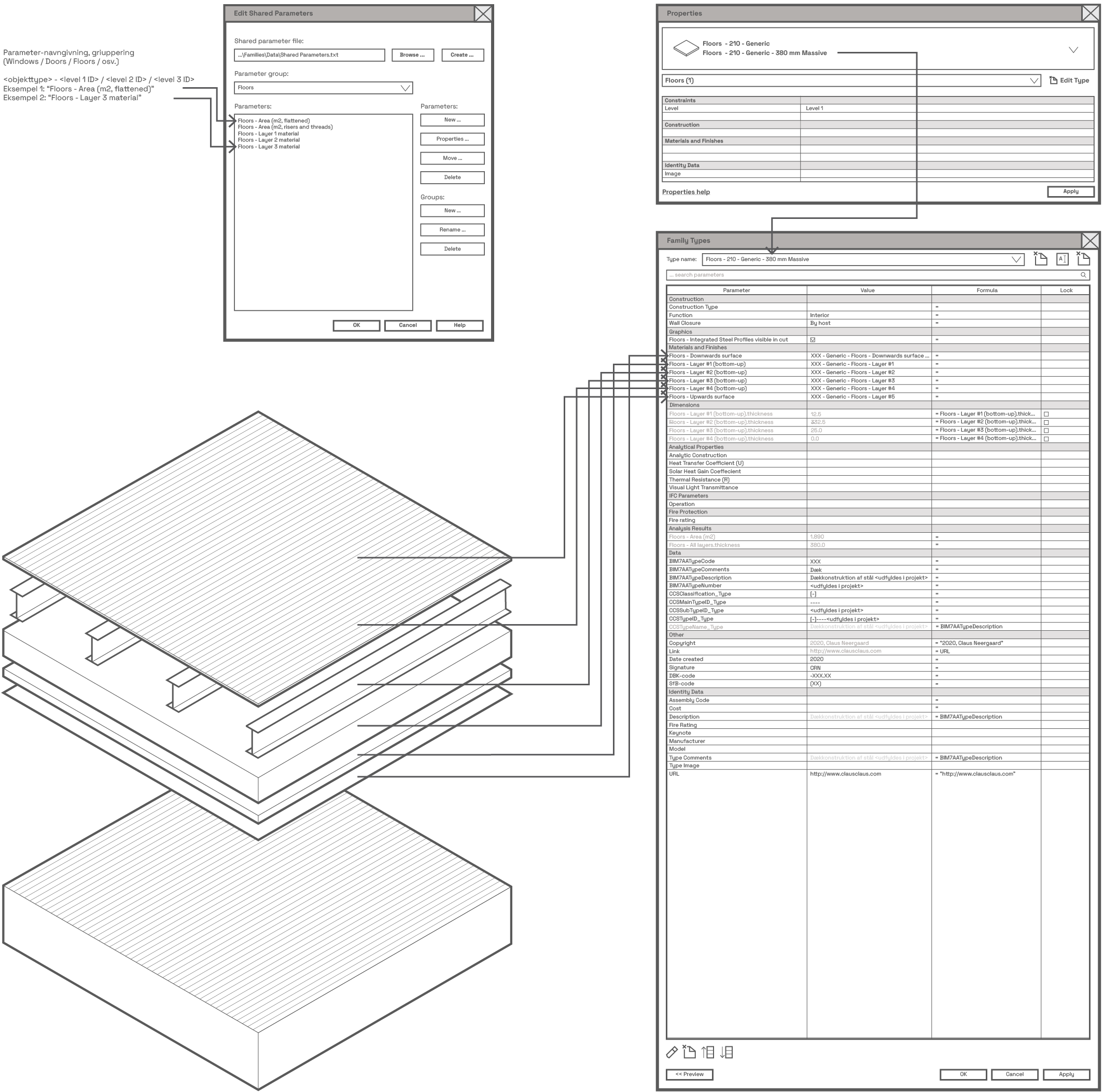
Floors opbygges i Revit ved at definere et omfang af det pågældende Floor-element, gennem enten en skitse (i sketch-mode) eller ved at udvælge omkringliggende / afgrændsende Walls. Dette udføres typisk i plan-view.
Floor-elementets tykkelse vokser nedad, i relation til det plan omfangs-skitsen udføres i.
Det er muligt at lave Floors med hældning og Floors med lagopbygning, i samme stil som med Wall-definitionerne. Alle lagene kan tilknyttes materialer, i stil med rammerne omkring opbygning af Walls (se andetsteds, i nærværende publikation). Yderligere, kan der defineres hældning på specifikke gulvtyper, i grader.
Der er forskel på “Structural Floors” og “Floors”, i de tilknyttede properties. “Structural Floors” har, bl.a., properties i tilknytning til armering, hvor de regulære “Architectural Floors” har de kendte, standardiserede properties.
[...]
<GROUPING>.<FLOORS>
<parameter>.<type>.<formula>.<lock>.<project param/family param/shared param/global param>.<nested parameter fra nested family>
<GRAPHICS>
<”Floors - Bottom plate visible”>.<yes/no>.<none>.<no>.<project param/family param/shared param/global param>.<no>
<”Floors - Frame visible”>.<yes/no>.<none>.<no>.<project param/family param/shared param/global param>.<no>
<MATERIALS AND FINISHES>
<”Floors - Bottom plate material”>.<pull-down>.<none>.<no>.<project param/family param/shared param/global param>.<no>
<”Floors - Frame material”>.<pull-down>.<none>.<no>.<project param/family param/shared param/global param>.<no>
<”Floors - Glass material”>.<pull-down>.<none>.<no>.<project param/family param/shared param/global param>.<no>
<ENERGY ANALYSIS>
<”Production / Extraction of raw materials”>.<>.<string>.<none>.<no>.<project param/family param/shared param/global param>.<no>
<”Production / Transportation to production”>.<>.<string>.<none>.<no>.<project param/family param/shared param/global param>.<no>
<”Production / Material production”>.<>.<string>.<none>.<no>.<project param/family param/shared param/global param>.<no>
<”Construction / Transportion to site”>.<>.<string>.<none>.<no>.<project param/family param/shared param/global param>.<no>
<”Construction / Installation”>.<>.<string>.<none>.<no>.<project param/family param/shared param/global param>.<no>
<”Usage / Operation and maintenance”>.<>.<string>.<none>.<no>.<project param/family param/shared param/global param>.<no>
<”Usage / Replacement”>.<>.<string>.<none>.<no>.<project param/family param/shared param/global param>.<no>
<”Usage / Conversion”>.<>.<string>.<none>.<no>.<project param/family param/shared param/global param>.<no>
<”Usage / Energy for Building maintenance”>.<>.<string>.<none>.<no>.<project param/family param/shared param/global param>.<no>
<”Usage / Water usage”>.<>.<string>.<none>.<no>.<project param/family param/shared param/global param>.<no>
<”End-of-Life / Demolition”>.<>.<string>.<none>.<no>.<project param/family param/shared param/global param>.<no>
<”End-of-Life / Transportation for waste management”>.<>.<string>.<none>.<no>.<project param/family param/shared param/global param>.<no>
<”End-of-Life / Waste management”>.<>.<string>.<none>.<no>.<project param/family param/shared param/global param>.<no>
<”End-of-Life / Disposal”>.<>.<string>.<none>.<no>.<project param/family param/shared param/global param>.<no>
<”Next product system / Reuse-/recycle-portential”>.<>.<string>.<none>.<no>.<project param/family param/shared param/global param>.<no>
<”Environmental impact / Greenhouse effect”>.<>.<string>.<none>.<no>.<project param/family param/shared param/global param>.<no>
<”Environemntal impact / Deplation of Ozone layer”>.<>.<string>.<none>.<no>.<project param/family param/shared param/global param>.<no>
<”Environmental impact / Photochemical Ozone creation”>.<>.<string>.<none>.<no>.<project param/family param/shared param/global param>.<no>
<”Environmental impact / Acidification”>.<>.<string>.<none>.<no>.<project param/family param/shared param/global param>.<no>
<”Environmental impact / Nutrient load”>.<>.<string>.<none>.<no>.<project param/family param/shared param/global param>.<no>
<”Resource consumption category / Total primary energy consumption”>.<>.<string>.<none>.<no>.<project param/family param/shared param/global param>.<no>
<”Resource consumption category / Renewable primary energy consumption”>.<>.<string>.<none>.<no>.<project param/family param/shared param/global param>.<no>
<DIMENSIONS>
<”Height”>.<float>.<Rough Height - ([Doors - Join]).<no>.<project param/family param/shared param/global param>.<no>
<”Thickness”>.<float>.<0 mm>.<no>.<project param/family param/shared param/global param>.<no>
<”Floors - Frame / offset”>.<float>.<none>.<no>.<project param/family param/shared param/global param>.<no>
<”Floors - Frame / profile / width”>.<float>.<none>.<no>.<project param/family param/shared param/global param>.<no>
<ANALYTICAL PROPERTIES>
<”Analytic Construction”>.<>.<string>.<no>.<project param/family param/shared param/global param>.<no>
<”Heat Transfer Coeffecient (U)”>.<>.<none>.<no>.<project param/family param/shared param/global param>.<no>
<”Solar Heat Gain Coeffecient”>.<>.<none>.<no>.<project param/family param/shared param/global param>.<no>
<”Thermal Resistance (R)”>.<>.<none>.<no>.<project param/family param/shared param/global param>.<no>
<”Visual Light Transmittance”>.<>.<none>.<no>.<project param/family param/shared param/global param>.<no>
<IFC PARAMETERS>
<”Operation”>.<>.<string>.<none>.<no>.<project param/family param/shared param/global param>.<no>
<FIRE PROTECTION>
<”Fire rating”>.<>.<string>.<none>.<no>.<project param/family param/shared param/global param>.<no>
<ANALYSIS RESULTS>
<”Floors - Area (m2)”>.<float>.<(Rough Height * Rough Width)>.<no>.<project param/family param/shared param/global param>.<no>
<DATA>
<”BIM7AATypeCode”>.<integer>.<none>.<no>.<project param/family param/shared param/global param>.<no>
<”BIM7AATypeComments”>.<string>.<none>.<no>.<project param/family param/shared param/global param>.<no>
<”BIM7AATypeDescription”>.<string>.<none>.<no>.<project param/family param/shared param/global param>.<no>
<”BIM7AATypeNumber”>.<integer>.<none>.<no>.<project param/family param/shared param/global param>.<no>
<”CCSClassification_Type”>.<string>.<none>.<no>.<project param/family param/shared param/global param>.<no>
<”CCSMainTypeID_Type”>.<string>.<none>.<no>.<project param/family param/shared param/global param>.<no>
<”CCSSubTypeID_Type”>.<string>.<none>.<no>.<project param/family param/shared param/global param>.<no>
<”CCSTypeID_Type”>.<string>.<none>.<no>.<project param/family param/shared param/global param>.<no>
<”CCSTypeName_Type”>.<string>.<none>.<no>.<project param/family param/shared param/global param>.<no>
<OTHER>
<”Copyright”>.<string>.<=”2020, Claus Neergaard”>.<no>.<project param/family param/shared param/global param>.<no>
<”Link”>.<URL>.<=URL>.<no>.<project param/family param/shared param/global param>.<no>
<”Date created”>.<2020>.<none>.<no>.<project param/family param/shared param/global param>.<no>
<”Signature”>.<CRN>.<none>.<no>.<project param/family param/shared param/global param>.<no>
<”DBK-code”>.<-205.03>.<none>.<no>.<project param/family param/shared param/global param>.<no>
<”SfB-code”>.<(32)>,<none>.<no>.<project param/family param/shared param/global param>.<no>
<IDENTITY DATA>
<”Assembly Code”>.<>.<string>.<none>.<no>.<project param/family param/shared param/global param>.<no>
<”Cost”>.<>.<integer>.<none>.<no>.<project param/family param/shared param/global param>.<no>
<”Description”>.<”Pladedør <udfyldes i projekt>.<”=BIM7AATypeDescription”>.<no>.<project param/family param/shared param/global param>.<no>
<”Fire Rating”>.<>.<string>.<none>.<no>.<project param/family param/shared param/global param>.<no>
<”Keynote”>.<>.<string>.<none>.<no>.<project param/family param/shared param/global param>.<no>
<”Manufacturer”>.<>.<string>.<none>.<no>.<project param/family param/shared param/global param>.<no>
<”Model”>.<>.<string>.<none>.<no>.<project param/family param/shared param/global param>.<no>
<”Type Comments”>.<”Pladedør <udfyldes i projekt>”>.<=BIM7AATypeDescription>.<no>.<project param/family param/shared param/global param>.<no>
<”Type Image”>.<>.<none>.<no>.<project param/family param/shared param/global param>.<no>
<”URL”>.<”http://www.clausclaus.com”>.<=”http://www.clausclaus.com”>.<no>.<project param/family param/shared param/global param>.<no>

Definition from buildingSMART: A slab is a component of the construction that normally encloses a space vertically. The slab may provide the lower support (floor) or upper construction (roof slab) in any space in a building. It shall be noted, that only the core or constructional part of this construction is considered to be a slab. The upper finish (flooring, roofing) and the lower finish (ceiling, suspended ceiling) are considered to be coverings. A special type of slab is the landing, described as a floor section to which one or more stair flights or ramp flights connect. May or may not be adjacent to a building storey floor.
A slab may have openings, such as floor openings, or recesses. They are defined by an IfcOpeningElement attached to the slab using the inverse relationship HasOpenings pointing to IfcRelVoidsElement.
A particular usage type for the IfcSlab can be given (if type information is available) by referring to the type object IfcSlabType, using the IfcRelDefinesByType relationship, or (if only occurrence information is given) by using the PredefinedType attribute. Values of the enumeration are 'Floor' (the default), 'Roof', 'Landing', 'Baseslab', 'Notdefined'. If the value 'UserDefined' is chosen, the user defined value needs to be given at the attribute ObjectType.
HISTORY: New entity in IFC Release 2.0, it is a merger of the two previous entities IfcFloor, IfcRoofSlab, introduced in IFC Release 1.0
Type Use Definition
The IfcSlab defines the occuurence of any slab, common information about slab types (or styles) is handled by IfcSlabType. The IfcSlabType (if present) may establish the common type name, usage (or predefined) type, common set of properties, common material layer set, and common shape representations (using IfcRepresentationMap). The IfcSlabType is attached using the IfcRelDefinedByType.RelatingType objectified relationship and is accessible by the inverse IsDefinedBy attribute.
As an additional use agreement for standard slabs (i.e. slabs with constant thickness along the extrusion direction), the IfcSlabType should have a unique IfcMaterialLayerSet, that is referenced by the IfcMaterialLayerSetUsage assigned to all occurrences of this slab type.
Klik her, for at komme tilbage til oversigten, eller klik på følgende, for at se nærmere på de enkelte objekters data;
Revit Families: Walls (system Family)
Revit Families: Curtain Walls (system Family)
Revit Families: Stairs (system Family)
Revit Families: Railings (system Family)
Revit Families: Doors (loadable Family)
Revit Families: Windows (loadable Family)
Revit Families: Curtain Wall Panels (loadable Family)
Revit Families: Furniture (loadable Family)
Revit Families: Detail Components (loadable Family)